
Fill Out Your W-9 Form, Request for Taxpayer Identification Number in Seconds with AI
Stop retyping your name, address, and TIN every time a new client asks for a W-9. Upload the PDF, answer a few plain-English questions, and Simplicity AI fills every field accurately. Review, sign, and export a clean W-9 ready to send.

AI converts your W-9 into a smart, interactive form. No manual tapping, zooming, or aligning fields on the PDF.
Upload a source document like a previously completed W-9, and AI auto-fills the new one instantly.
Enter your details once. Reuse them every time a client, vendor, or bank requests a new W-9.
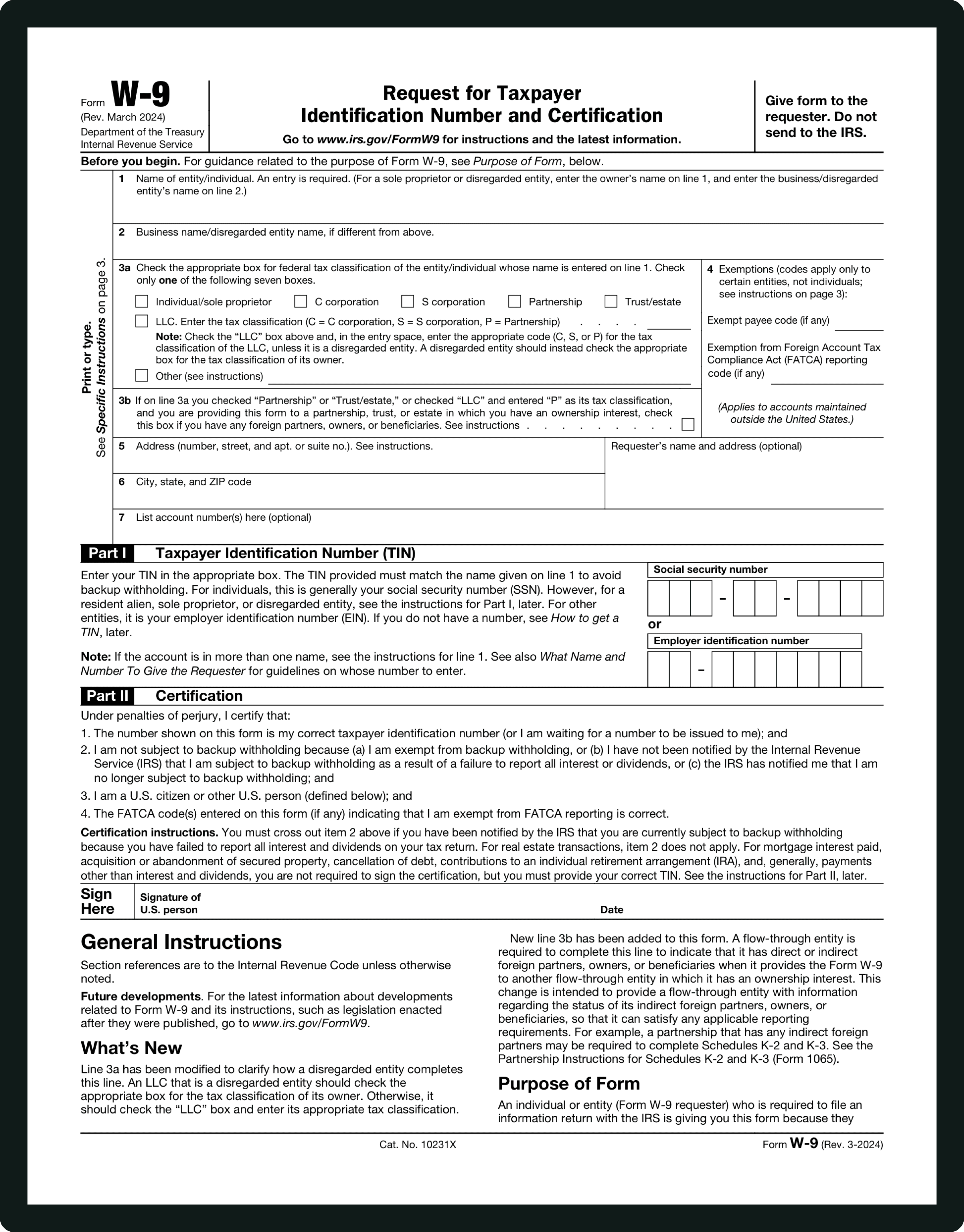
Form INFORMATIONS
Line 1 - Name:
Your full legal name exactly as it appears on your tax return. If you're a sole proprietor, this is your personal name, not your business name.
Line 2 - Business Name:
Only fill this in if your business name is different from Line 1. LLCs, DBAs, and trade names go here.
Line 3a - Tax Classification:
Check one box: Individual/Sole Proprietor, C Corporation, S Corporation, Partnership, Trust/Estate, or LLC. If you're an LLC, you also need to note your tax classification (C, S, or P).
Line 3b - Foreign Partners:
New as of the March 2024 revision. Partnerships and trusts: Check this if they have foreign partners, owners, or beneficiaries.
Line 4 - Exemptions:
Most individuals leave this blank. Corporations and certain entities enter exempt payee codes and FATCA reporting codes here.
Lines 5 & 6 - Address:
Your mailing address where the requester will send tax documents, like your 1099-NEC.
Part I - TIN:
Enter your Social Security Number (SSN) or Employer Identification Number (EIN). This must match the name on Line 1 to avoid backup withholding.
Part II - Certification:
Read the certification statements, sign, and date. If you've been notified by the IRS that you're subject to backup withholding, you must cross out item 2.
WHAT IS A W-9 FORM?
What Is Form W-9 and Who Needs to Fill It Out?
IRS Form W-9, officially called "Request for Taxpayer Identification Number and Certification," is how you provide your legal name, address, and taxpayer identification number (TIN) to a business or client that pays you. It hasn't been filed with the IRS. Instead, the requester keeps it on file and uses it to prepare your 1099 at year-end.
If any of the following describe you, chances are someone's already asked you for a W-9 or will soon: Freelancers and independent contractors earning $600+ from a single client. Small business owners and sole proprietors work with vendors and clients. LLCs, partnerships, and corporations are onboarding with new business relationships. Banks and financial institutions are requesting TIN verification for interest or dividend reporting. Real estate agents, landlords, and attorneys receiving reportable payments.
The form itself is only one page, but the tax classification checkboxes, FATCA exemption codes, and certification language trip people up more often than they should. That's where Simplicity AI comes in.
How to Fill Out Your W-9 Online in 6 Simple Steps
1
Upload your W-9 PDF to Simplicity AI. The AI scans the form and converts it into a guided, interactive questionnaire.
2
Enter your full legal name and business name (if different) exactly as they appear on your tax return.
3
Select your federal tax classification: Individual/Sole Proprietor, C Corp, S Corp, Partnership, LLC, or Trust/Estate.
4
Provide your Taxpayer Identification Number (TIN), either your Social Security Number (SSN) or Employer Identification Number (EIN).
5
Sign and date the form electronically, right in your browser. No printing, no scanning, fully IRS-compliant.
6
Review every field for accuracy, then download your completed W-9 as a clean PDF ready to send.
Super Fast
Complete your W-9 in under 60 seconds. No copy-pasting between tabs, no switching tools, no aligning text boxes on a PDF.
AI-Powered
Simplicity AI understands the W-9's structure, from Line 1 through Part II certification. It maps your answers to the right fields so you don't have to decode IRS instructions.
Secure
Your W-9 contains sensitive data, such as your SSN or EIN. Documents are encrypted, handled privately, and never shared. Your data stays yours.
FAQs
W-9 Form: Frequently Asked Questions
Is the W-9 filed with the IRS?
No. The W-9 is never sent to the IRS. You give it to the person or company that requested it. They keep it on file and use the information to prepare your 1099 at the end of the tax year.
What's the penalty for not providing a W-9?
If you don't provide a W-9, your client may be required to withhold 24% of your payments as backup withholding. You could also face a $50 penalty from the IRS for failing to furnish your TIN.
Can I sign a W-9 electronically?
Yes. The IRS has accepted electronic signatures on W-9 forms since 1998. Simplicity AI lets you draw, type, or upload your signature directly in the browser.
How often do I need to fill out a new W-9?
There's no expiration date. However, you need to submit a new W-9 if your information changes, such as your name, address, business structure, or TIN.
I'm an LLC. Which box do I check on Line 3?
If your LLC is a single-member LLC (disregarded entity), check "Individual/Sole Proprietor." If it has multiple members, check "LLC" and enter "C," "S," or "P" to indicate your tax classification.
What's the difference between a W-9 and a W-4?
A W-9 is for independent contractors and freelancers. A W-4 is for employees. If taxes are being withheld from your paycheck, you're filling out a W-4. If you're responsible for your own taxes, you need a W-9.
Is my data safe when I fill out a W-9 on Simplicity AI?
Yes. Your W-9 contains sensitive information like your SSN or EIN. Simplicity AI uses encryption and controlled access and doesn't share your files or use your data to train AI models. You stay in full control.
Can Simplicity AI fill out other tax forms too?
Absolutely. Simplicity AI works with 1099-NEC, 1040-X, Form 941, 8889, 8949, and dozens of other tax, employment, immigration, healthcare, and legal forms.
Common W-9 Mistakes That Trigger IRS
Problems (and How AI Prevents Them)
Incorrectly Filling the Name
The most common W-9 error. Sole proprietors enter their business name on Line 1 instead of their legal name. LLCs enter a DBA or trade name. Line 1 must match the name on your tax return, period. Your business name goes on Line 2. Simplicity AI asks for each name separately and automatically places them in the correct fields.
Name Discrepancies
Your name on the W-9 must match what the IRS has on file. If you've changed your name through marriage, divorce, or legal proceedings and haven't updated it with the IRS, your W-9 will create a mismatch. For joint accounts, the name listed must match the TIN holder. AI can't fix an outdated IRS record, but it does flag when Line 1 and Part I don't align logically.
Improper Federal Tax Classification
This trips up LLC owners constantly. A single-member LLC should check 'Individual/Sole Proprietor,' not the LLC box. A multi-member LLC checks 'LLC' and must enter C, S, or P for its tax classification. Checking the wrong box can lead to incorrect 1099 reporting and backup withholding. Simplicity AI walks you through this with plain-English questions like 'How is your LLC taxed?' instead of making you decode IRS checkbox logic.
Inaccurate Exemption Codes
Most individuals and small businesses should leave Line 4 completely blank. But some filers add exemption codes they don't qualify for, or omit them when they should be included (common among corporations and certain financial entities). Simplicity AI only surfaces exemption fields when your tax classification requires them, so you're not guessing.
Failure to Indicate Foreign Status
Line 3b was added in the March 2024 revision. Partnerships, trusts, and estates with foreign partners, owners, or beneficiaries must check this box. Missing it can create reporting gaps under FATCA. Simplicity AI includes this question in the guided flow to prevent it from being overlooked.
Omission of Signature and Date
A W-9 without a signature is invalid. It sounds obvious, but it's one of the top reasons forms get sent back. People complete everything, export the PDF, and forget to sign. With Simplicity AI, the signature step is built into the workflow. You can't export until you've signed and dated, so nothing slips through.
Address and Contact Information Errors
The address on your W-9 is where your 1099 gets mailed. A typo, an old address, or a missing apartment number means your tax documents end up somewhere else. Simplicity AI lets you save your address and reuse it across forms, reducing inconsistencies across documents.
Misunderstanding Entity Types
Trusts, estates, and S corporations each have specific W-9 requirements that don't apply to individuals. Filers sometimes check boxes that don't match their entity structure, creating mismatches downstream when the requester prepares 1099s. The guided questionnaire adapts to your entity type, showing only fields relevant to your situation.
Incomplete Updates for Changes
Changed your business name? Moved to a new address? Converted your LLC from a partnership to an S corp? You need to submit a new W-9 with the updated information. Many people forget, and the old W-9 on file generates incorrect 1099s. Simplicity AI stores your details so you can update once and generate a corrected W-9 in seconds.
POPULAR FORMS
Popular forms ready for you to fill Instantly
Find commonly used government, legal, and official documents, already optimized for fast, stress-free filling with Simplicity AI. We’ve made them easier, smarter, and faster so you can move on with your day.
Tax Forms
Immigration Forms
Healthcare Forms
Employment Forms
Legal Forms
Motor Vehicle Forms
Experience instant PDF form filling with AI
